
Building Automations
Build automated workflows by connecting triggers to actions in APIANT's low-code automation editor. Learn workflow structure, configuration, and execution.
The automation editor is a low-code editor for building automated workflows. One or more triggers are connected to one or more actions:
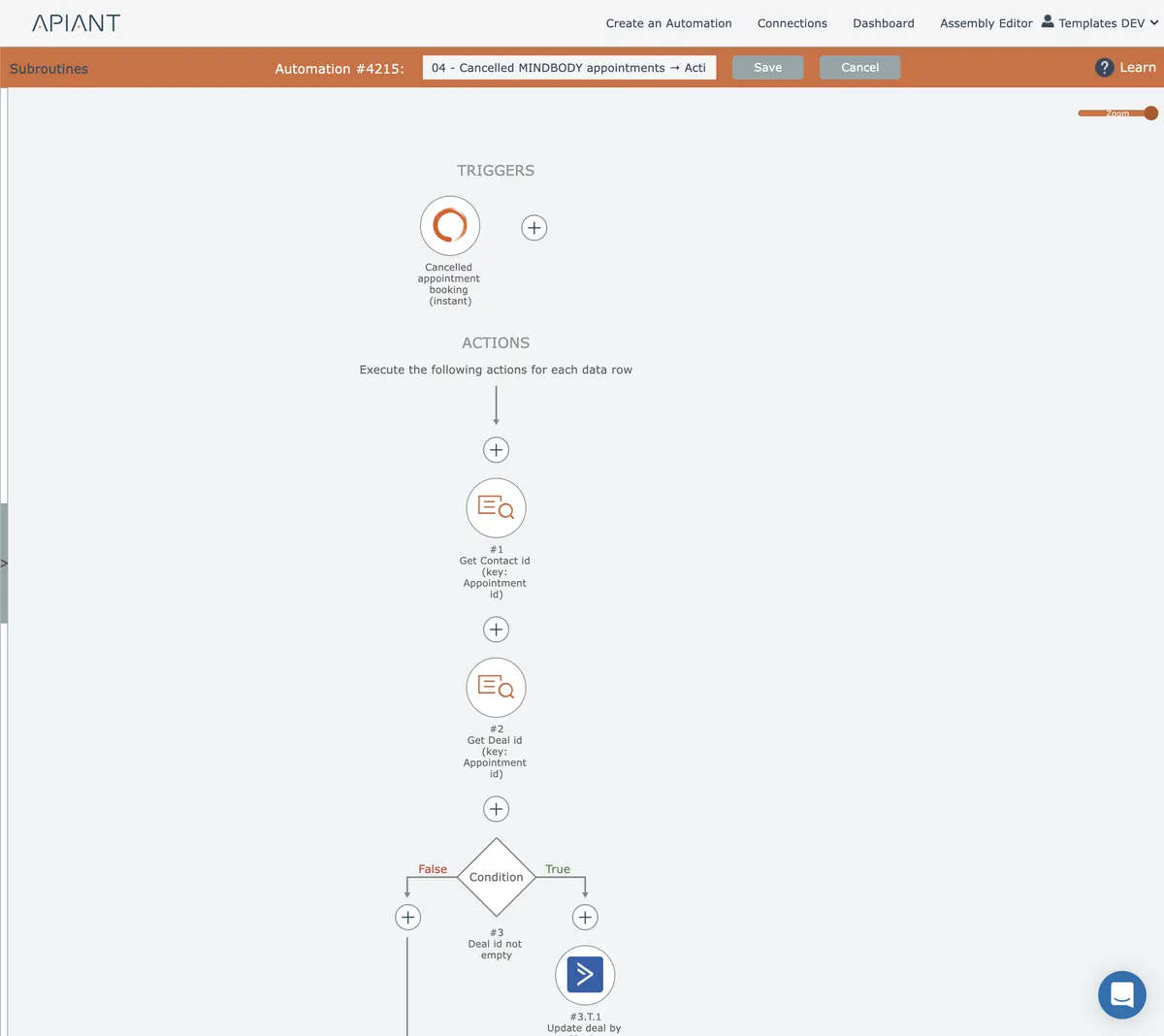
Read these subsections to learn how to build automations.
In this section
Action functionality
Actions are the executable tasks within workflows that automate manual processes and eliminate repetitive work, saving time and resources across your operations.
AI chatbots
AI-powered conversational agents that can be embedded into web pages and controlled through tool and goal automations to deliver intelligent responses.
Data Transforms
Data transforms convert and manipulate values between formats, with categorized actions for text, dates, numbers, and other data types accessible through the interface.
Datafiles
Capture automation data into daily CSV files for export to external tools like ChatGPT, organized by topic with configurable columns and file size limits.
Default automation settings
Configure default settings for new automations including error handling, logging, and execution parameters through your account settings menu.
Editor functionality
The automation editor includes tools for building workflows visually, with features for connecting nodes, configuring actions, and managing data flow without code.
Forms Overview
Native form functionality for automations using a drag-drop editor. Includes form triggers for public submissions and form actions with data mapping and submission awaiting.
MCP Tools
MCP (Model Context Protocol) is an open-source standard that allows artificial intelligence models to connect with external data sources and tools, enhancing their ability to access information and...
Moderation Queues
Implement human review checkpoints in automations using queues where reviewers approve or deny items before processing continues, with optional scope-based routing to different reviewers.
Rate Limits
Enforce request throttling across automations using named rate limiters with configurable scope levels, from single automation to entire tenant system.
Snoozing automations
Pauses automation execution for a specified duration, allowing workflows like marketing drip campaigns to resume processing at a scheduled time without server overhead.
Subroutines
Reusable automation logic blocks with defined inputs and outputs that reduce diagram complexity and allow shared functionality across multiple automations.
System Utilities
Built-in trigger and action capabilities available natively within the system without requiring external integrations.
Tips and Tricks
Essential techniques for optimizing automations, including workflow design patterns, performance best practices, and practical solutions to common challenges.
Trigger functionality
Exploration of what initiates automations, covering instant webhooks, polling schedules, datetime controls, and two-way sync triggers that emit data rows for processing.
Two-way sync
Bidirectional automation that mirrors data changes between two systems in both directions, with sync mapping management and dashboard controls.
Your first automation
Building your first automation requires adding a trigger and an action. Start by selecting an app or system utility trigger, configure any settings, then add an action to complete the workflow.