
CRMConnect: Mindbody → ActiveCampaign
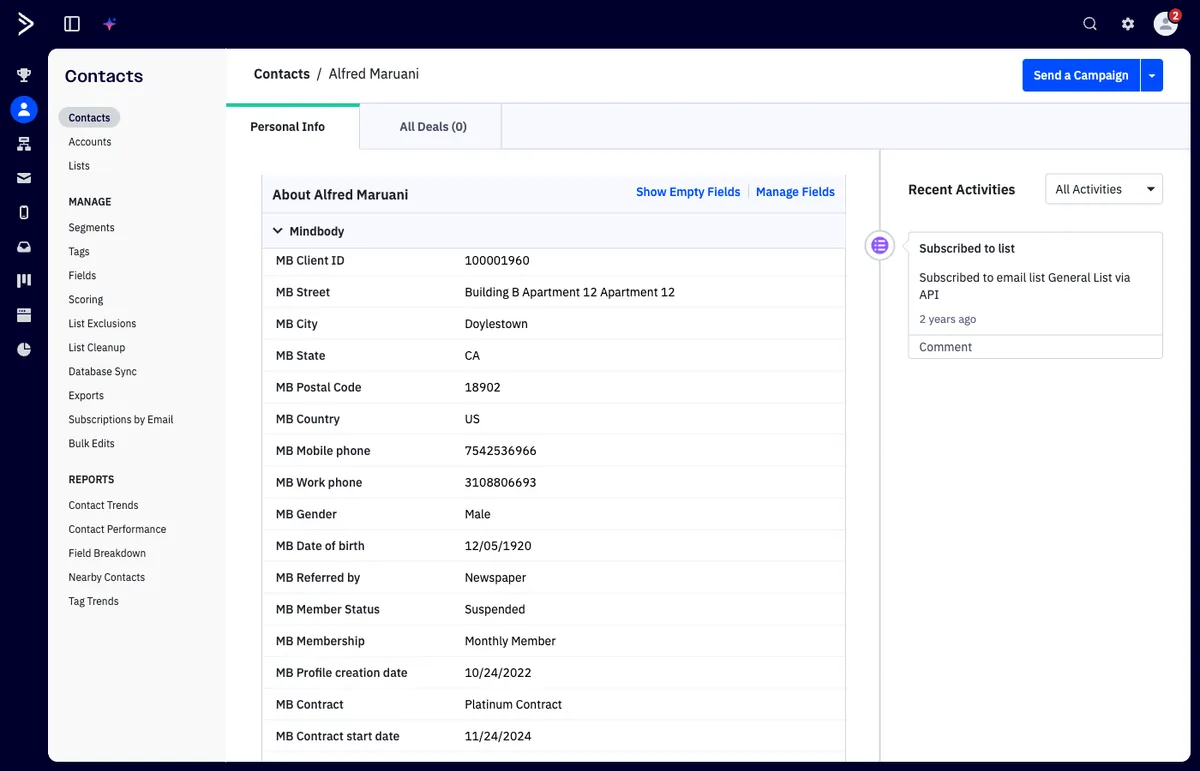
Turnkey bi-directional integration that syncs client profiles, 120+ custom fields, memberships, class bookings, appointments, visits, sales pipelines, and marketing automation data between Mindbody and ActiveCampaign — instantly.
CRMConnect: Mindbody → ActiveCampaign
Every client interaction in Mindbody — bookings, visits, purchases, memberships — flows into ActiveCampaign instantly, giving you the data you need to automate retention, re-engagement, and growth campaigns.
Current version: 1.50
What You Get
Know Every Client Instantly
Every Mindbody client syncs to ActiveCampaign the moment they're created or updated — with 120+ pre-built custom fields mapped automatically. No manual imports, no CSV files, no stale data.
Clients without an email? CRMConnect generates a unique placeholder email so every client record makes it into ActiveCampaign, no gaps.
Track Appointments in Real Time
Appointments sync instantly as they're booked, updated, or canceled in Mindbody. A reconciliation process runs automatically to catch anything missed, so your ActiveCampaign data always matches reality.
Use appointment data to trigger confirmations, reminders, no-show follow-ups, and rebooking campaigns — all driven by live data.
Track Class Bookings
Class reservations, cancellations, and waitlist changes flow into ActiveCampaign as they happen. Each contact's record shows their next booked class with date, time, location, and instructor.
Build automations around class attendance: welcome sequences for first-timers, win-back campaigns for lapsed attendees, or upsell flows when someone hits a milestone.
Track Class Completions
When a client completes a class in Mindbody, ActiveCampaign is updated automatically — including last visit details (date, type, staff, service). This gives you a true attendance record, not just booking intent.
Trigger post-class surveys, referral requests, or next-step offers based on what clients actually attended.
Monitor Memberships & Contracts
Membership status, expiration dates, remaining sessions, contract terms, and auto-pay status all sync continuously. Know exactly who's active, who's expiring soon, and who has lapsed.
Build proactive renewal campaigns, payment failure recovery flows, and win-back sequences — all triggered by real membership data.
Capture Sales & Revenue Data
Purchase history — intro offers, services, retail items — syncs to ActiveCampaign automatically. With the optional Sales Pipeline add-on, every transaction creates a deal in ActiveCampaign for full revenue attribution.
Connect marketing spend to actual revenue. Know which campaigns drive purchases, not just clicks.
Push Contacts Back to Mindbody
Apply the updatembo tag to any ActiveCampaign contact, and CRMConnect creates or updates that client in Mindbody automatically. Works with manual tagging, form submissions, or automation workflows.
Nurture leads in ActiveCampaign, then push them into Mindbody when they're ready to book — closing the loop between marketing and operations.
If a contact can't be pushed to Mindbody
If Mindbody rejects the contact, CRMConnect adds a tag to the contact in ActiveCampaign so you can see what went wrong and fix it:
| Tag | Meaning | What to do |
|---|---|---|
MBO update failed | The contact has no email, or Mindbody refused to create or update the client — most often because your Mindbody site requires a field (such as birthday or mobile number) that the contact doesn't have. | Check your required client fields in Mindbody (Settings → Client Required Fields). Add the missing details to the contact, or make that field optional in Mindbody. Then remove the failure tag and apply updatembo again. |
MBO update failed - cross regional issue | The client exists at another location in your Mindbody region and could not be updated at this location. | Contact support@apiant.com. |
Tip: build an ActiveCampaign segment or automation on these tags so failed pushes are followed up.
Support Multiple Locations
Connect multiple Mindbody sites to a single ActiveCampaign account. Each client is automatically segmented by location, so you can run location-specific campaigns or roll everything up for a global view.
What Syncs
| Data | Direction | How Fast |
|---|---|---|
| Client profiles (120+ fields) | Mindbody ↔ ActiveCampaign | Instant |
| Class bookings & cancellations | Mindbody → ActiveCampaign | Instant |
| Class completions & attendance | Mindbody → ActiveCampaign | Within minutes of class end |
| Appointment bookings & updates | Mindbody → ActiveCampaign | Instant + reconciliation |
| Visits & check-ins | Mindbody → ActiveCampaign | Instant + daily reconciliation |
| Memberships & contracts | Mindbody → ActiveCampaign | Instant |
| Sales & purchases | Mindbody → ActiveCampaign | Instant (pipeline add-on: periodic) |
| Contact → client push | ActiveCampaign → Mindbody | Instant (tag-triggered) |
Historical Data on Setup
When CRMConnect is first installed, it doesn't just start from zero:
- Clients: All existing Mindbody clients sync into ActiveCampaign
- Classes: Scheduled classes up to 1 year ahead are processed, populating "Next Class" fields from day one
- Appointments: 7 days back, 30 days forward (default)
- Visits & Sales: 1 month back (default)
Extended historical imports are available (subject to Mindbody API fees).
Setup
- Connect — Link your Mindbody and ActiveCampaign accounts in the CRMConnect dashboard. No developers required.
- Configure — Select which data types to sync. The system handles data logic, deduplication, and field mapping automatically.
- Grow — Build ActiveCampaign automations using the synced client data to drive retention, re-engagement, and upsell campaigns.
Setup typically completes in under 30 minutes.
Pricing
| Plan | Price | Includes |
|---|---|---|
| Base | $169/mo | Core bi-directional sync, first 5,000 clients |
| 5,001–10,000 clients | $43/thousand | Additional client tier |
| 10,001–25,000 clients | $30/thousand | Additional client tier |
| 25,001–50,000 clients | $26/thousand | Additional client tier |
| 50,000+ clients | $23/thousand | Additional client tier |
| Appointments Sync & Pipeline | $89/mo | Add-on module |
| Sales Sync & Pipeline | $89/mo | Add-on module |
| Additional Mindbody Location | $49/mo | Per location |
| Per-location Appointments | $25/mo | Per additional location |
| Per-location Sales | $25/mo | Per additional location |
Requirements
- Active Mindbody subscription
- ActiveCampaign subscription (Lite plan minimum for basic sync; Plus or higher for deal pipelines and advanced automations; Professional plan for SMS and attribution reports)
- No coding or developer resources required
FAQ
What happens with clients who don't have an email address?
CRMConnect automatically creates unique placeholder emails using a configured domain, ensuring all Mindbody clients sync into ActiveCampaign regardless of whether they have an email on file.
How does the reverse sync (ActiveCampaign → Mindbody) work?
Applying the updatembo tag to an ActiveCampaign contact triggers client creation or update in Mindbody. This works with manual tagging, form submissions, or automated workflows. The tag is removed automatically after processing to prevent duplicates. If Mindbody rejects the contact, an MBO update failed tag is added instead — see If a contact can't be pushed to Mindbody.
How quickly do changes appear?
Client profile changes, class bookings, appointment updates, membership changes, and visit check-ins sync instantly — typically within seconds. Automated reconciliation processes run periodically to catch edge cases and ensure nothing is missed.
Which ActiveCampaign plan do I need?
Lite plan works for basic client sync. Plus plan or higher is needed for deal pipelines. Professional plan is required for SMS integrations and attribution reports.
Who builds the ActiveCampaign automations?
CRMConnect syncs the data; you build automations within ActiveCampaign directly. APIANT offers referrals to ActiveCampaign partners for automation design and implementation support.
How does CRMConnect compare to Zapier or Make?
CRMConnect includes 120+ pre-built field mappings, placeholder email generation, deduplication, and deal pipeline creation out of the box. DIY tools require weeks of setup, cost $500+/month at scale, and need ongoing maintenance. CRMConnect starts at $169/month with VIP support included.