
Allow multiple devices
Restrict Zoom participant join links to single device usage to prevent clients from sharing meeting access with unauthorized users.
Avoid the possible sharing of Zoom participant join links
You can choose to avoid the possibility of your clients sharing their Zoom join links with others.
To do this, you can disable the ZoomConnect setting "Allow multiple devices":
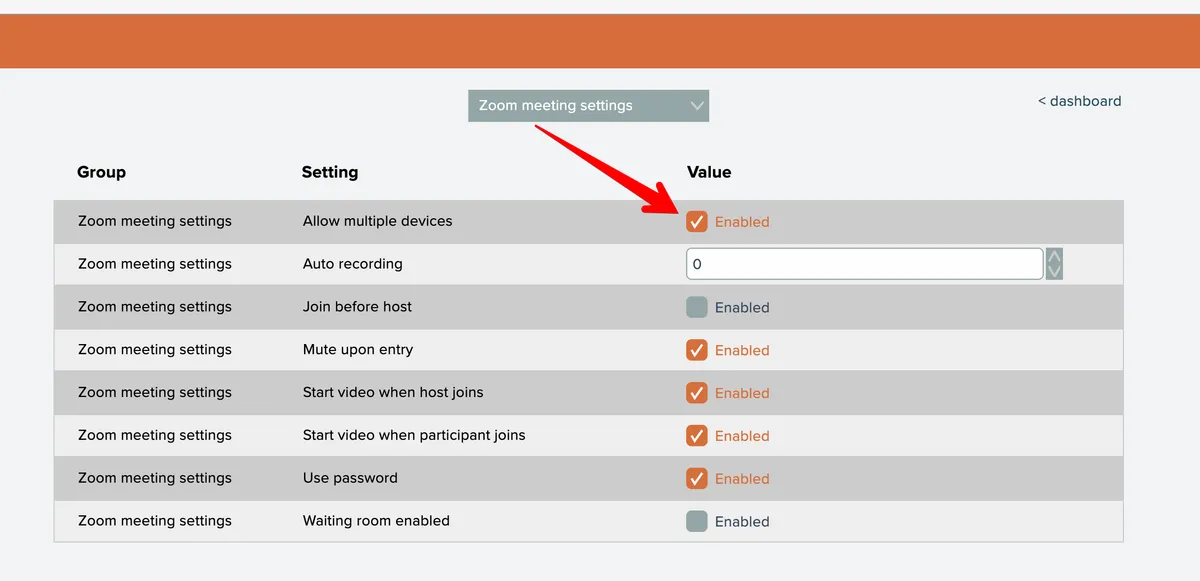
Unchecking the setting will cause the Zoom participant link to not be usable on multiple devices, therefore avoiding the possibility that your clients will be able to share their meeting links with other people.
NOTE: If you are using the "shareble client" feature, you cannot turn off this setting.
NOTE: this Zoom setting prevents usage of the participant join link on multiple devices in general. If your client has a problem using the join link with their computer and would like to switch to another device, this will not work due to that setting.