
GuideAPI Appsv1
ZoomBOT to Update a Zoom Meeting for Mindbody Appointments
Use the ZoomBOT keyword in a Mindbody appointment's notes to refresh that appointment's Zoom meeting link.
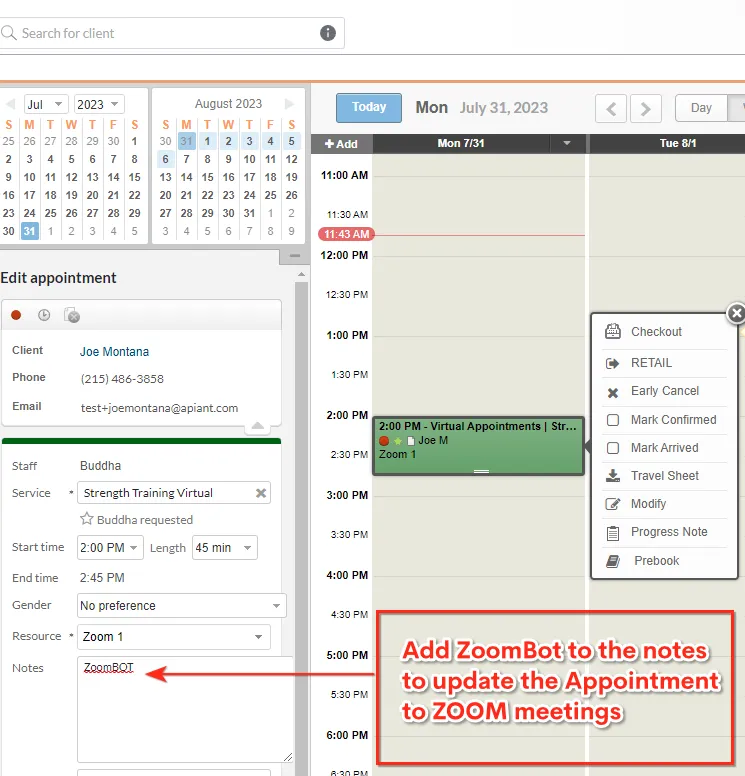
Add the keyword ZoomBOT to a Mindbody appointment's notes to refresh that appointment's Zoom meeting link.
Place the keyword on its own, separate from any existing notes in the field. Appointments scheduled more than 30 days out are not updated this way. After you confirm the update in your Zoom account, you can remove ZoomBOT from the appointment note.
Testing steps
- Create an appointment in Mindbody and save it.
- Edit the appointment, add ZoomBOT to the notes field, and save. This creates the meeting without sending a client notification.
- Edit the appointment again, add any additional notes while keeping ZoomBOT in the field, and save. This sends an email notification to the client.
- Edit the appointment once more to remove ZoomBOT from the notes field, and save.
Related docs
Last updated June 11, 2026