
FAQ and Troubleshooting
How the syncs work, your sync options, and what to check first.
How your donor data syncs
MailConnect runs three syncs, each with its own job and schedule:
| Sync | What it does | When it runs |
|---|---|---|
| Donor sync | New or updated DonorPerfect donors update their Mailchimp member profile (mapped fields, flags as tags) | Every 5 minutes |
| Gift sync | A new or updated gift refreshes that donor's Mailchimp profile (gift totals, last gift date, and so on) | About every 15 minutes |
| Daily filter sync | Your DonorPerfect Selection Filters (named with the DP - prefix) update the matching Mailchimp segments — who is in, who is out | Once nightly (around 1 AM in your account timezone) |
Two practical consequences:
- Donor profile changes appear in Mailchimp within minutes. Fields and tags ride the donor sync (every 5 minutes) and gift sync (about every 15).
- Segment membership catches up overnight. A donor who newly matches (or stops matching) a
DP -filter moves in or out of the corresponding Mailchimp segment on the nightly run — so filter-driven grouping can take up to a day. If you need it sooner, see Run a sync manually below.
New donors enter Mailchimp through your DP - filters: when a donor first matches a filter, the nightly sync adds them to the audience and segment, and from then on the donor and gift syncs keep their profile current.
Your sync options
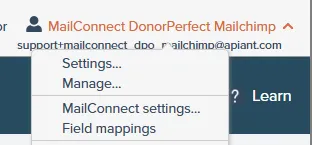
Open the settings from the top-right account menu: click your account name, then MailConnect settings…
| Setting | What it controls |
|---|---|
| Sync DonorPerfect flags | Turns each of a donor's DonorPerfect flags into a Mailchimp tag (the tag is the flag's description). On by default. |
| Remove Mailchimp tags | (new in v1.1) When a flag is removed from a donor in DonorPerfect, the matching Mailchimp tag is removed on that donor's next sync. Off by default — see the FAQ below for exactly how it behaves. |
| Remove emails from DonorPerfect | When Mailchimp marks an address as cleaned (hard bounce), the email is removed from the donor record in DonorPerfect so you stop mailing a dead address. |
| Custom fields | Enables syncing of your custom DonorPerfect field selections (see Field mappings on the main guide). |
| Trigger sync | Runs the filter/segment sync on demand — see below. |
| Version | The integration version installed on your account. |
Run a sync manually
If you have just changed a filter or updated donors in bulk and do not want to wait for the nightly run:
- Click your account name (top right), then MailConnect settings…
- On the General settings screen, tick Trigger sync.
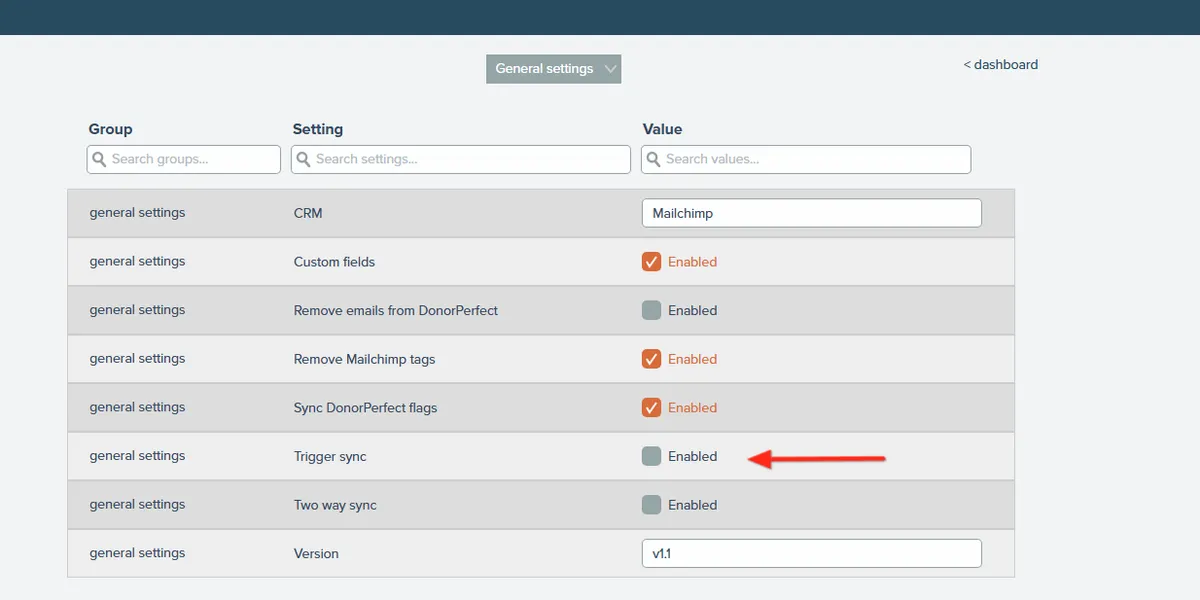
The filter/segment sync starts within about 15 minutes, and the Trigger sync box unticks itself once the run has been picked up — you do not need to turn it back off. For large donor lists the run itself can take a while (it processes your whole filter membership), so allow up to an hour before comparing counts.
Note: the manual sync updates segment membership only — it does not add or remove tags. Tags are added or removed by the donor sync, which runs automatically about every 5 minutes.
FAQ
A donor exists in DonorPerfect but I cannot find them in Mailchimp
Check, in order: the donor has an email address in DonorPerfect (donors without one cannot be synced to an email platform); the donor matches one of your DP - filters (that is how donors enter Mailchimp — verify with the filter in DonorPerfect's Advanced Search); the nightly sync has run since the donor started matching; and your account is within its donor limit for your plan.
I updated a donor and Mailchimp still shows old data
Donor updates normally land within about 5 minutes. If it has been longer, check the donor still has a valid email, and check whether Mailchimp has archived or cleaned the address — cleaned addresses no longer accept updates (that is a Mailchimp deliverability rule, not a sync gap).
Tags are not appearing on my members
Tags are created from DonorPerfect flags when the donor syncs — meaning tags appear (or update) when the donor record or one of their gifts changes, not on the nightly filter run. Add or change a flag and the tag will follow on that donor's next sync. Also confirm Sync DonorPerfect flags is enabled in your MailConnect settings.
I removed a flag in DonorPerfect but the tag is still in Mailchimp
Tag removal is optional and off by default. Ask us (or check MailConnect settings) to enable Remove Mailchimp tags. Once enabled, it works going forward: when a flag is removed in DonorPerfect, the matching tag is removed on that donor's next sync. Tags whose flags were removed before the option was enabled are not swept retroactively — remove those directly in Mailchimp once.
Will the integration delete tags I added by hand in Mailchimp?
No. The integration only ever removes tags that it created from DonorPerfect flags. Tags you add manually in Mailchimp are never touched.
Two donors share one email address — what happens?
Mailchimp treats each email address as unique, so donors sharing an address end up as a single Mailchimp contact, and whichever donor synced most recently supplies that contact's field values. If the donors need separate marketing profiles, give them distinct email addresses in DonorPerfect.
Can I sync more than one DonorPerfect filter?
Yes — every Selection Filter named with the DP - prefix becomes its own Mailchimp segment. The base plan includes one synced filter; additional filters can be added for $9/month each. Contact sales@apiant.com to add more.
Can I sync more than 15 donor fields?
The integration syncs up to 15 DonorPerfect fields as Mailchimp merge fields. That ceiling comes from Mailchimp's own merge-field limits — it leaves you room for merge fields of your own alongside the synced ones. You can choose which 15 fields sync at any time via Field mappings (see the main guide).
Is there a limit to how many donors I can sync each month for $49?
Yes, the base price of $49/month covers syncing for up to 1,000 donors, with the option to add more donors at $15 per additional 1,000 donors.
The limit counts unique donors synced all-time, not donors currently in DonorPerfect. Once a donor has been synced, they count toward your limit permanently — removing donors from DonorPerfect (or from your filters) does not free up capacity.
What happens when I reach my plan's donor limit?
New donors stop being added to Mailchimp until the limit is raised — donors already synced keep updating normally. You receive an alert email when the limit is reached (with periodic reminders while you remain over it).
Because the limit counts all-time synced donors, removing donors from DonorPerfect does not bring you back under it — the only way to continue syncing new donors is to raise the limit. Contact sales@apiant.com to increase your donor limit.
Does a donor's "Do Not Email" preference carry over to Mailchimp?
Yes — the No Email flag and No Email Reason are among the default synced fields, so each Mailchimp contact carries the donor's current preference. Use them in a Mailchimp segment to exclude those contacts from sends. Note the integration does not unsubscribe members: unsubscribes, bounces, and cleaned addresses remain managed by Mailchimp itself.
Does the integration change my data in DonorPerfect?
Only one thing, and only if you enabled it: with Remove emails from DonorPerfect on, a Mailchimp-cleaned (hard-bounced) address is removed from the donor record. Everything else is read-only — DonorPerfect remains your source of truth.
Everything stopped syncing at once
The usual cause is a changed DonorPerfect password or expired API access: every sync fails together because the connection itself is down. Reconnect DonorPerfect from your MailConnect account (or contact support and we will walk you through it).
Who do I contact?
support@apiant.com. Include your organization name and, if the question is about a specific donor, the donor's email address or DonorPerfect donor ID. Do not send passwords or API keys by email.